Hello VFX community  .
.
what i’m about to show you is a vfx i made lately:
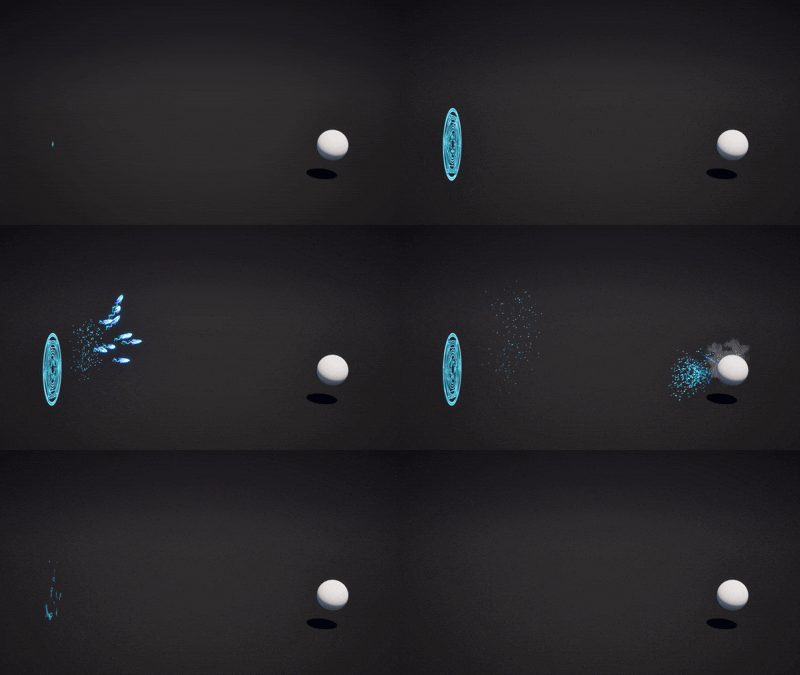
I basically worked on this project with the idea of applying what I’d learned from Niagara Modules, and in that case, I succeeded.
But even before that, I wanted to try something else: preparing it as if I were going to use it in a video game.
So, I’ll lay it out: I suck at blueprints, I’m horrible, disgusting, terrible. That said, I tried anyway.
(First Problem): Collision Box
The first problem that plagued me was box collision. Lately, I’ve always been working with single projectiles, so when I spawned the Niagara within the blueprint, I just had to add a collision box. But here, the Niagara spawned multiple projectiles, it moves randomly and everything. Was there a way to apply collision to multiple projectiles spawning at the same time?
(Second Problem): Give the niagara VFX a target
That’s why I watched two videos about it:
The first was to apply projectile movement within the VFX (which apparently, I think, is used for almost all projectile VFX) and set homing to true, but this wouldn’t work because there were multiple projectiles (I even tried, but it almost burned my computer, lol).
The second was him using spring force and creating a variable that he then looked at within the blueprint, this creating a target. But the problem with this is that I didn’t like how it immediately reacted to the target and chased it. So I thought about using the point attraction force and creating a variable as the target that I would later call within the blueprint, but that… didn’t work, so like a good person I gave up and changed the offset of the point attraction force within the world so that it looked like it was chasing the ball, but I just placed a mesh on top and increased the kill sphere so that it looked like it had collisions  . Yeah, i know, i sucks.
Video i meant with the spring force ( https://www.youtube.com/watch?v=cKwG9BZGyko&list=PLCggMVYqnCPI4oKOTqZZJ-rqHTZ5ott7j&index=4 )
SOOOOOOOO this isn’t a huge request for help, but it was more about understanding how I could go about it, so I can fix it in the future when I need it. I even tried Unreal documentation and everything, but I couldn’t find anything, and after four days of my head spinning, I made sure it was more of a visual thing than a practical one. So, big VFX community, mostly those who know this technical stuff much better than me (even a child would know more than me) I ask, how could I have approached all this?