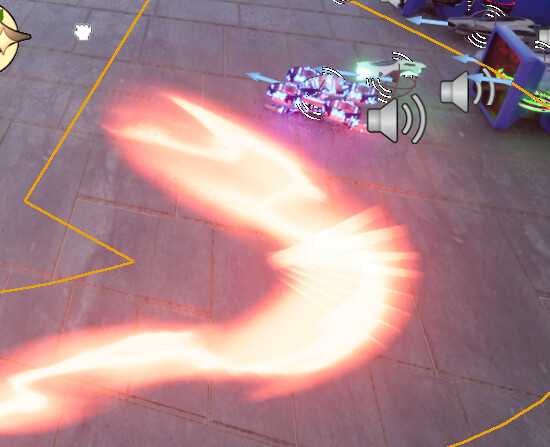
Hi there! Im new in VFX and got an issue while making trails with ribbon renderer
The thing is- when my niagara moves too slow or twist too much i get clipping moments as if it was spawning really small renderers that make effect look ugly. Any ideas how to fix it?
I do not use anything special - just ribbon renderer, spawn rate of 200+ particles, some velocity and intialize particle+particle state +solve forces and velocity(as simple thingies)
I use screen facing mode, Ribbon shape is plane
Would be glad to get some help!
p.s. im using uneal engine 5.4
Hi! I’d say that’s happening because your particle spawning is not uniform. If you use spawn rate to spawn particles in a ribbon, when the ribbon moves fast its segments will be more separated from each other, but when it slows down, they will get very close and cause these kinds of artifacts and clippings.
Best way to deal with this is to change your spawn method to a Spawn Per Unit, since that way it’ll spawn a new particle (a new ribbon segment) when the system has moved an x amount of units, so it’ll be uniform if it moves slow or fast.
Also another thing that will help is not having such a wide ribbon. It seems like the texture you’re using is much thinner than the actual size of the ribbon, you should try to make it match more closely, that way the clipping will be less visible and also you won’t have too much overdraw with the translucent material.
Hope it helps!
Btw this kind of clipping happens only when your trail makes sharp turns as that’s when having too many segments is more noticeable and they start overlapping
2 Likes
i made it less wide as u said and switched to spawn per unit and now it looks much better. Thank you so much!
1 Like
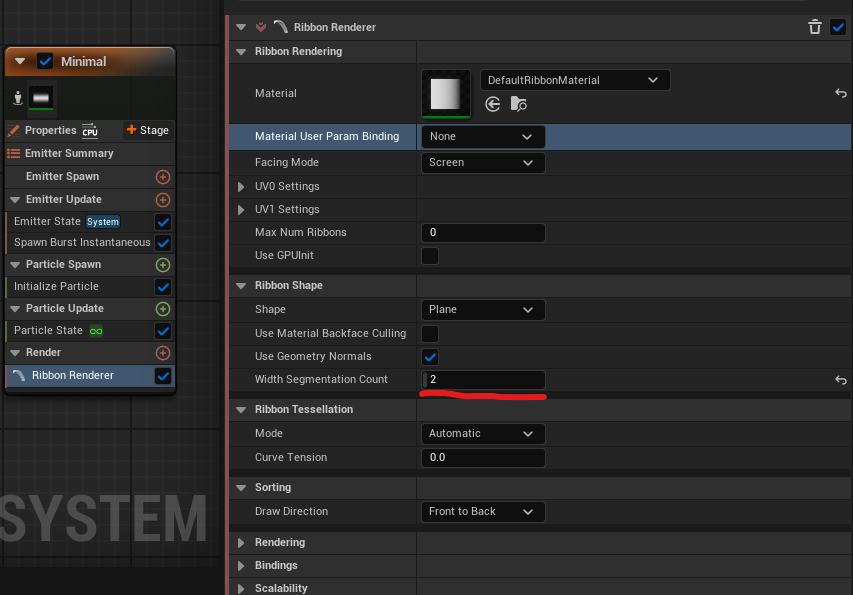
Just remembered that I forgot to add that you can increase the Width Segmentation Count in the Ribbon Renderer to around 2 or 3 and that also helps greatly with clipping. Although be careful cause it considerably increases the number of geometry rendered by the ribbon!