I managed to get it working in scratchpad! It dramatically speeds up the entire workflow. Now this method is actually viable! Here is the setup…
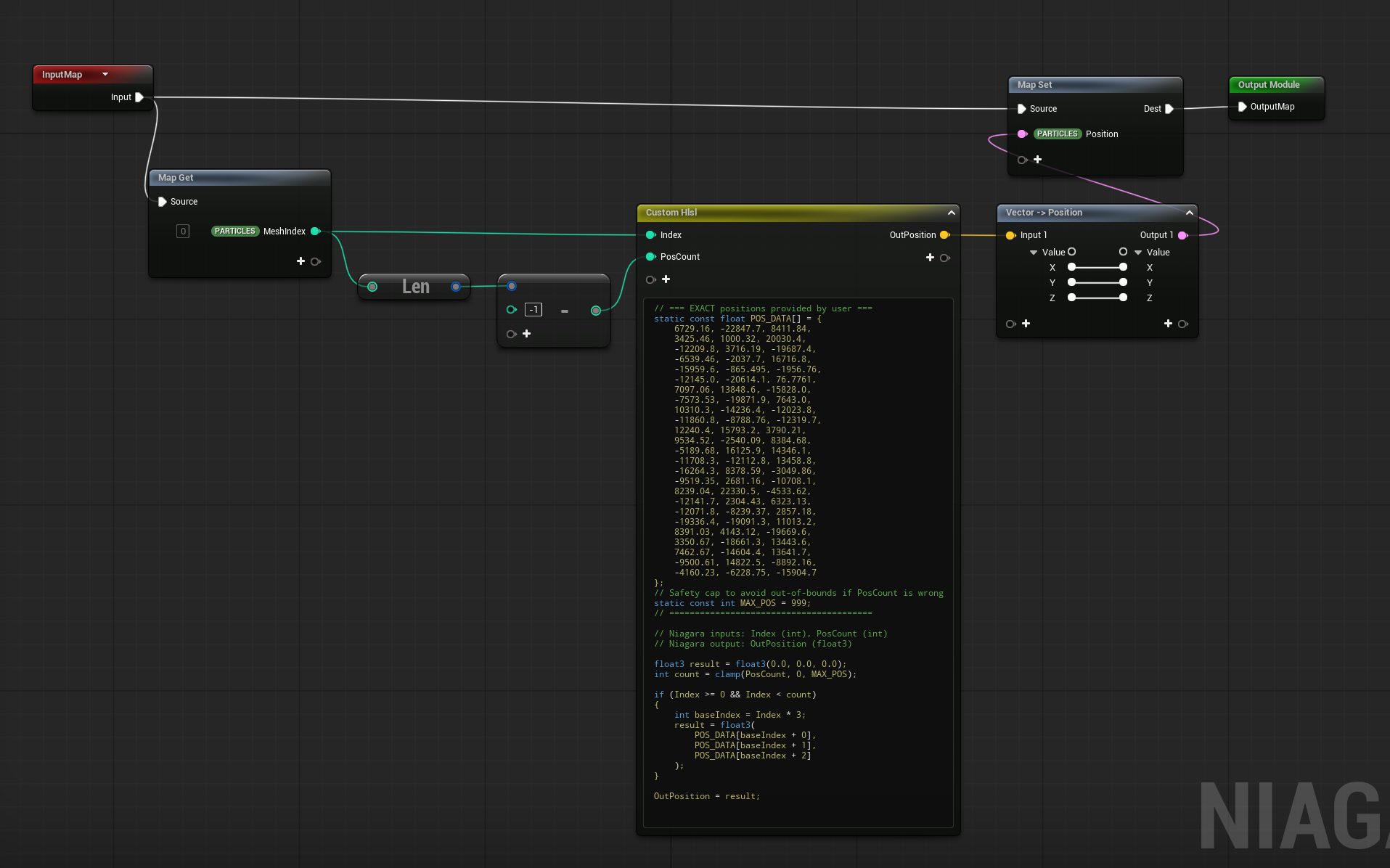
It stores all the vectors as an array and then maps each line to the mesh index. The first line is index0, the second is index1 etc. This way i can copy/paste the entire block of vectors that are output from my 3ds max script. I might make a mini tutorial later. This may be useful to others who want a cheap way to destroy a mesh. This could also be combined with sim stages to do a PBD physics simulation if you want all the pieces colliding and interacting. Lots of possibilities!
// === EXACT positions provided by user ===
static const float POS_DATA[] = {

//Paste X/Y/Z vectors here.

};
// Safety cap to avoid out-of-bounds if PosCount is wrong
static const int MAX_POS = 999;
// ========================================

// Niagara inputs: Index (int), PosCount (int)
// Niagara output: OutPosition (float3)

float3 result = float3(0.0, 0.0, 0.0);
int count = clamp(PosCount, 0, MAX_POS);

if (Index >= 0 && Index < count)
{
    int baseIndex = Index * 3;
    result = float3(
        POS_DATA[baseIndex + 0],
        POS_DATA[baseIndex + 1],
        POS_DATA[baseIndex + 2]
    );
}

OutPosition = result;