Really nice smoke, any tips on getting that looking volumetric like you’ve done please ? thanks
Wow, thats great.
I love the back to arm VFX, any chance for better Niagara screenshots of this, would love to know how this works better, never seen anything like this, but i dont see much about it on the screens.
1 Like
This type of work is truly inspiring! Its one thing to make a nice looking explosion or flipbook, its entirely another to create something like this. The whole effect tells a story and has character. It doesn’t just look amazing, it is also technically very impressive. To be able to put this together in such a seamless way shows true dedication to the craft. This is the quality of effect I would expect to see as a hero effect in a game that has a large portion of the gameplay built around it. Bravo sir!!!
I would love to see a more technical deep dive into the niagara setup and blueprints!
1 Like
Thank you for this great review, unfortunately I don’t have time now, I’m busy with a new project in a game studio, and it takes a lot of time and effort.
Really cool, the only thing that bothers me is the little explosion thing at the end. I thought the robots were sacrificing one of their own, it took me a bit to understand they were making a focus thing. My only critique would be to add emphasis on the beam bomb thing. Overall though great work 
I just decided not to overload the effect with the drones disappearing. Niagara with drones contains all the drone actions: gunshots, explosions, sparks, and smoke. It seemed to me that Niagara already had enough going on. A good way to make the drones disappear would be to create a bit of electricity around the body, sparks, and pieces of metal that fly off during the explosion, and do them one at a time, not all at once.
I have found out i keep watching this at least once a week , its really good, haven’t found anything similar, it would be nice to at least have better quality niagara/bps screenshots for the drone vfx, so we can have some guesswork fun trying to recreate it, just by names of the modules.
Hey Szefo,
I’ve actually received a lot of feedback and requests for tutorials on this project — one of them even came from Rebelway. I really like the format I used here, though.
I might think about it more and possibly take some steps toward creating a small course on this project or maybe another format with a similar approach. Unfortunately, there’s a lot of piracy out there, so I really need to consider how to make it convenient and ensure my work isn’t wasted.
Right now, I’m super busy with the current project, and I’ll probably only have some free time closer to the New Year. I’ll think about it during the holidays.
3 Likes
Well ok thats nice, i hope something will happen towards this, but i was thinking only about some basic, beginner stuff, with niagara, i didnt think about the whole project, process or anything, thats way too much. Houdini is above my reach anyway.
Thats why i was thinking just about some better screenshots, thats all, if u dont want to share any screenshots as a form, lets say, beginner niagara hints, well then ok, but thats unfortunate, any hints would be nice.
Im kinda surprised piracy was even mentioned, im new here so maybe i dont get it.
Still its looking really nice, and new year is kinda far away, if there is plan for some idk, paid course, fine, but if it will contain everything then it could be too big to just get some helpful tips about just the niagara part, idk, just my thoughts.
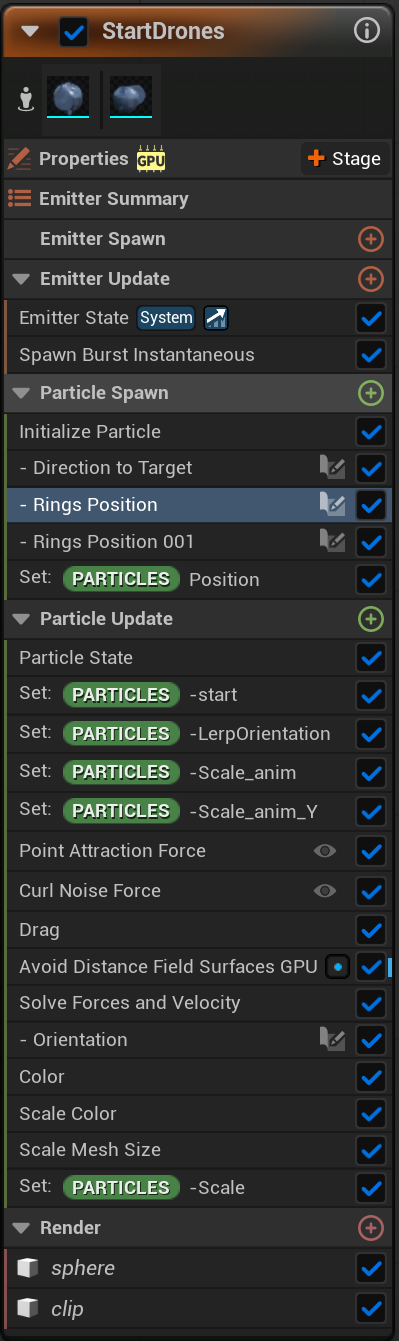
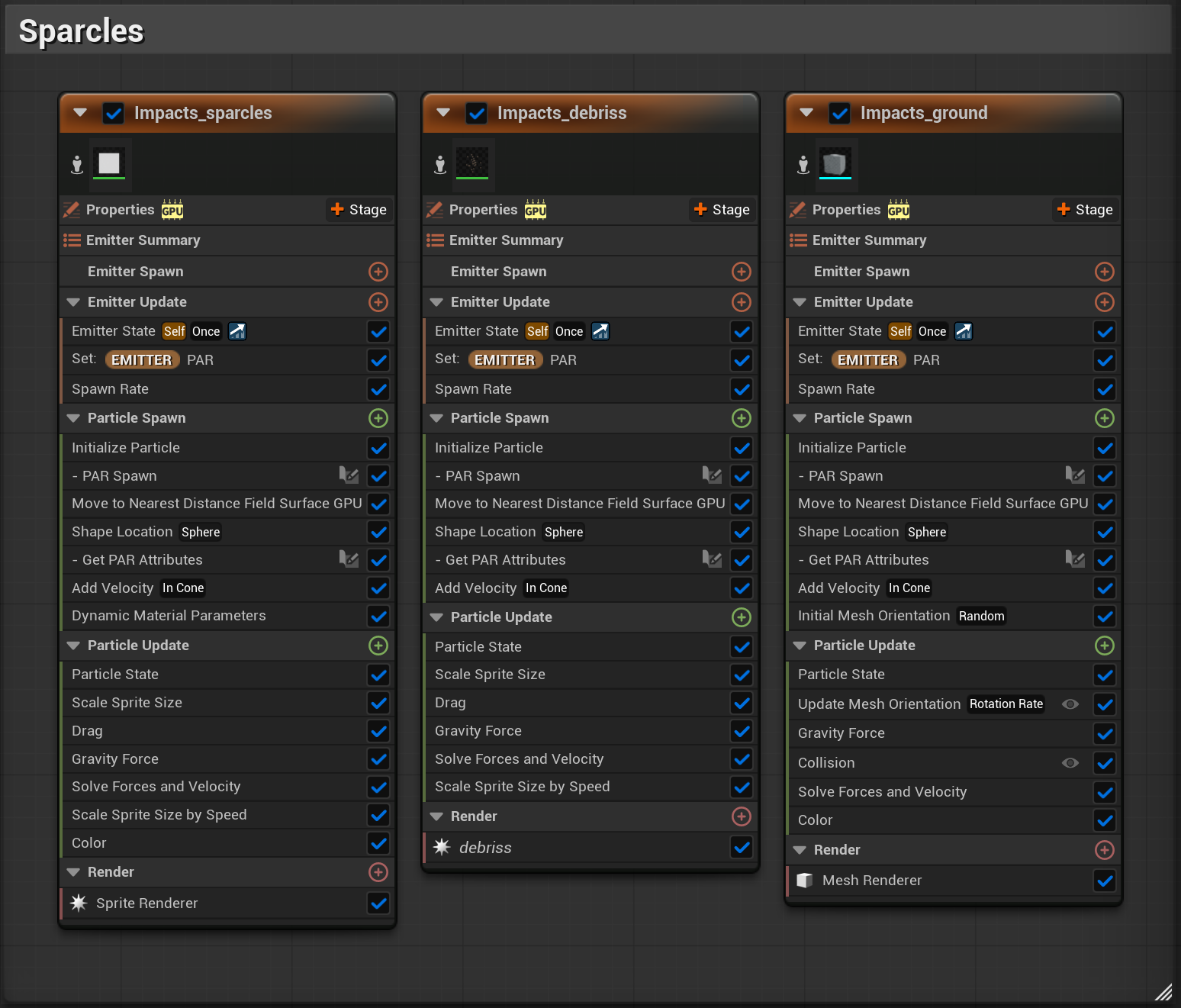
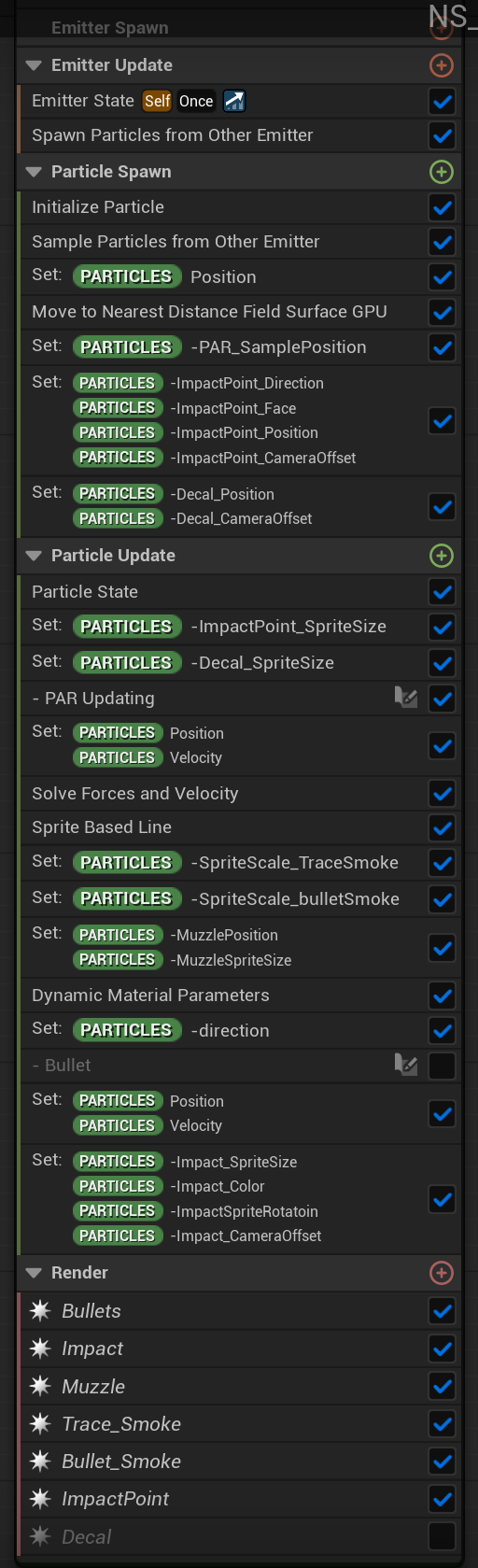
I only mentioned piracy because, if I ever decide to make a paid course, it’s not something that can just be put together and uploaded easily — it takes a lot of time and effort beyond just making the course itself.
As for the screenshots — I don’t think they’ll really help. This effect isn’t something I’d call beginner-friendly, since it uses several custom modules. If you’re already looking at low-quality screenshots and can’t quite understand how it was built, then even high-resolution ones probably won’t make a big difference.
I totally understand you as a beginner — I was the same way. I always wanted to create something interesting, not boring.
I used Particle Attribute Reader and several custom setups for attribute transfer (it’s basically a Houdini-like approach). If you think about how it could be done, there aren’t that many options — either on GPU or CPU, and on GPU only through Particle Attribute Reader. It’s not some big secret or overly complex system, but there are so many small details that it’s impossible to cover everything in a single post.
If you’re a beginner and want to understand this effect, it’s honestly too advanced to start with. There are plenty of great beginner tutorials on YouTube, even specifically on this topic (Particle Attribute Reader).
Anyway, here are a few high-quality screenshots — though I’m not sure what exactly you’re hoping to see in them.
Thanks a lot for your comment, and for mentioning that you’re a beginner. For me, that means if I ever organize a course or share lessons, I’ll keep in mind how to structure the material properly — starting from the basics and explaining the simple things that would actually help beginners.
If you’re aiming to create AAA-quality effects, unfortunately, it’s going to be quite difficult to rely solely on Substance Designer. I mentioned this software because it’s one of the easiest tools to start with — kind of like a first aid kit for texture creation.
If you give Houdini a try, that doesn’t mean you have to immediately start making effects at a Hollywood level. Yes, it’s not the simplest program for beginners, but believe me — even for simple tasks, it can be very enjoyable to use once you get familiar with it.
1 Like
And please note, since you’re new here — this section is meant for portfolios, not tutorials.
There are many different sections on this website. When I created this post, I was simply sharing my thoughts while working on my portfolio piece. It wasn’t intended as a beginner’s lesson or a tutorial at all.
I expected that people who already understand how effects are made could take some of my ideas and use them as inspiration to create something of their own.
As for the course, I’m currently leaning toward using Patreon and uploading everything there in order.
It has paid subscription options, and I could split the content into different access tiers — covering both beginner topics and more advanced ones.
It’s only because people ask me, and like you, for which some basic knowledge and something interesting is needed, to be honest, I don’t have much time to fully engage in this.
1 Like
Wow, this is amazing, thank u for the screenshots, actually i did try to read the low-quality screens and wasn’t able to read many things, ofc i did recognise some things, but the quality was just too low.
So actually, this is already very very helpful, frankly im surprised that its using that little custom modules, i was expecting more.
I was trying to do the drones myself, i had something very crude working, but not quite as cool, i had fun guessing how did he do the drones going from back to hand animation avoiding the mesh, is it really avoiding it real-time, are those some collisions or maybe there is a hidden spline they follow somehow, but then, its a SK thats animated, so the spline would need to account for that too, so i assumed it wont be a spline, but one of the other methods.
And look at that, now i know its really real-time avoidance, no baked effect. The screens are all i ever asked, ofc i wasnt asking for a tutorial, i know it wasn’t the intention, just for little more data.
If u are seriously considering making a course out of this in future and to be approachable also for beginners i might have some points to share as a Niagara beginner.
Make it approachable for anyone, from beginners to pro, the main issue for beginners will be Houdini, its an industry standard, but its very complicated and it isn’t easily available to ppl just learning or even indies and also take a lot of time to learn, so many ppl wont even invest time to learn some of it just for course like that, when they might be only interested just like me in the unreal and niagara part to use in a game or cinematics.
So if for any step Houdini is absolutely not crucial, dont force it, or provide ready made asset, or replacement asset, for everyone that would not need or want to skip that part, if its crucial in some way, this can be explained, or provided an universal way to do similar thing.
With Substance its easier, its way easier and possible to get by everyone, so that is not that of an issue, but again, if its needed, should have an option of ready asset, replacement or universal explanation.
It would be just best to structure the course in a way that it is very universal and doesn’t force everyone into doing all of it themselves as they might have no access or desire to use or learn software XY and if the area of their interest lies just i one thing.
This way it would be very approachable to anyone.
And yeah i forgot about Patreon, dont know why i didn’t think about it, actually i think this is an excellent idea. U could even provide different tiers for additional parts like Substance, Houdini or just ue and niagara, there are many options.
And i would say i hope u will do it, i might be a beginner at niagara, but im good at other things, im also especially good at knowing when i see something unique and very good, and this is it, u are very skilful, i have been learning niagara for some time before i discovered this topic, i have seen dozens upon dozens of niagara effects very recently, ton of tutorials, blogs, the best i could find, the thing u showed here is the very top of the top, didnt see anything close, its just not niagara effect alone, its integrating it all in ue with blueprints, the effect, animation, assets, materials etc. into a playable concept and it looks just amazing.
So go for it, i hope u do, and thanks again for all u shared.